Talend Open Studio + JRE Error

I’ve just installed TOS 8 on my Windows 10 machine, and after trying to execute it an error appears (I wonder if some day a program running Java not bundled will work at first after being installed):
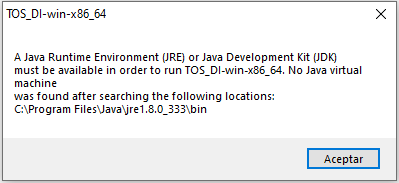
After installing the latest JDK version, it always throughs the same error.

No matter the times you install/uninstall JDKs, change environment variables, try to launch an inexistent Java Control Panel: always the same error.

The solution
  • Go to Start Button in Windows
  • Locate the TOS Menu
  • Open TOS Menu and right-click on icon launcher
  • Click on More
  • Click on Open File Location
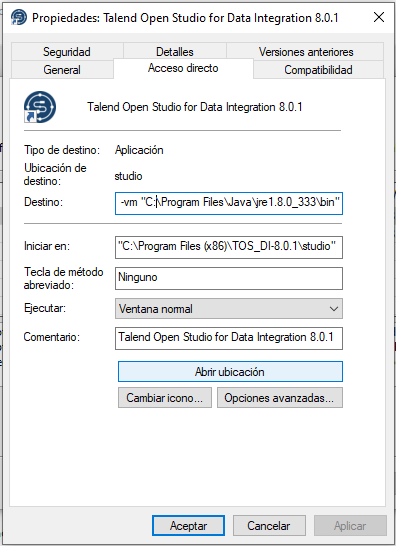
  • Right-Click the Link File and click on Properties
  • Change the Destination folder to the one containing your Java binaries
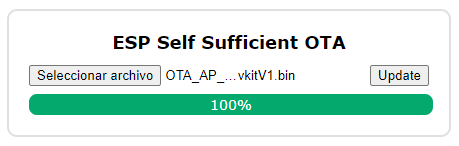
ESP32 OTA in AP mode: ESP2SOTA

If you are trying to implement OTA functionality for your ESP32 / ESP8266 with AP Wifi Mode enabled, try this simple Arduino Library:

ESP2SOTA Library - ESP32 OTA in AP Mode

Library link: Github Repository

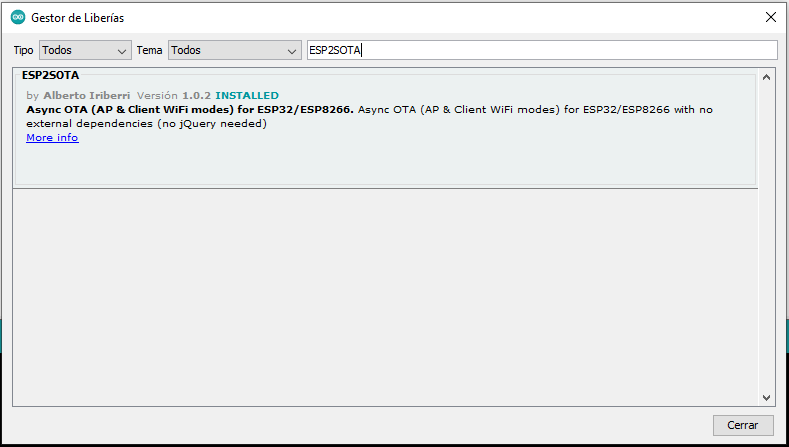
You can also install the library directly from Arduino IDE. Just click on Library Manager and search for ESP2SOTA

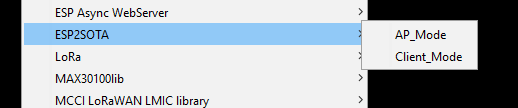
By installing the library, two code samples will be available, one for AP Mode and the other one for Client Mode

Sample sketch:

#include <WiFi.h>
#include <WiFiAP.h>
#include <WebServer.h>
/* INCLUDE ESP2SOTA LIBRARY */
#include <ESP2SOTA.h>

const char* ssid = "ESP2SOTA";
const char* password = "123456789abc";

WebServer server(80);

void setup(void) {
  Serial.begin(115200);
  WiFi.mode(WIFI_AP);  
  WiFi.softAP(ssid, password);
  delay(1000);
  IPAddress IP = IPAddress (10, 10, 10, 1);
  IPAddress NMask = IPAddress (255, 255, 255, 0);
  WiFi.softAPConfig(IP, IP, NMask);
  IPAddress myIP = WiFi.softAPIP();
  Serial.print("AP IP address: ");
  Serial.println(myIP);

  /* SETUP YOR WEB OWN ENTRY POINTS */
  server.on("/myurl", HTTP_GET, []() {
    server.sendHeader("Connection", "close");
    server.send(200, "text/plain", "Hello there!");
  });

  /* INITIALIZE ESP2SOTA LIBRARY */
  ESP2SOTA.begin(&server);
  server.begin();
}

void loop(void) {
  /* HANDLE UPDATE REQUESTS */
  server.handleClient();

  /* YOUR LOOP CODE HERE */


  delay(5);
}